A lot of stores don’t just sell one type of product anymore. You’ll see clothing mixed with accessories, jewelry near beauty items, sometimes even small lifestyle goods all in the same space. That’s fine — it can actually increase basket size if it’s done properly.
The problem is most stores don’t structure these mixed areas well. Everything ends up blending together, and customers don’t know where to focus.
Keep Categories Separate, But Connected
You don’t need hard separation between product types, but you do need clear zones.
Clothing stays on racks. Jewelry stays in cases or on stands. Beauty or accessory items get their own defined space. When everything has a “home,” customers can move between categories without getting confused.
Where it works best is at the edges of those zones — that’s where you can start mixing things slightly.
Use Cross-Display to Suggest Add-Ons
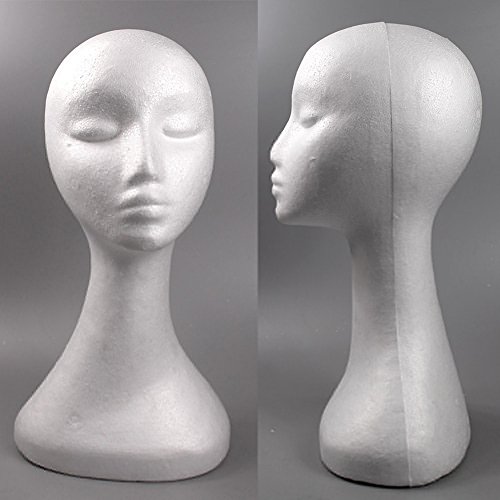
Instead of fully combining categories, use small displays to connect them.
For example, placing a female mannequin wig display near an apparel section can make sense if you’re selling items that work together. It gives context without taking over the whole area.
You’re not merging categories — you’re linking them.
This works especially well for:
- accessories paired with outfits
- beauty items near fashion pieces
- add-ons that complete a look
Don’t Let One Category Take Over
When you mix products, one category usually ends up dominating the space.
That’s where things start to look messy. If a clothing rack is surrounded by too many unrelated items, it loses focus. Same with smaller products — they get lost if they’re placed next to larger fixtures.
Keep balance in mind. Each category should still feel like it has its own space, even when placed close together.
Use Fixtures That Match the Product
Not every fixture works for every product.
Trying to display everything on the same type of fixture is where a lot of layouts fail. Clothing needs racks. Jewelry needs smaller, more controlled displays. Wigs or headwear need proper forms to look right.
Using the correct fixture for each category keeps the store looking intentional, even when different product types are close together.
Think About Customer Movement
When categories are mixed properly, they should feel like a natural progression.
A customer browsing clothing should be able to move toward accessories without hitting a visual wall or a confusing layout shift. Transitional areas are key here — small display zones that guide the flow rather than interrupt it.
This is where compact displays and standalone pieces work well. They help bridge sections without overcrowding them.
Avoid Overcrowding the Middle of the Store
The center of the store is where things can get out of control quickly.
Too many mixed displays in one area create visual noise. Customers don’t know where to look, so they don’t engage with anything.
Keep the middle clean and focused. If you’re going to mix categories, do it in controlled spots — not everywhere at once.
Keep It Easy to Reset
Mixed displays need more maintenance than single-category ones.
Items get moved, picked up, and put back in the wrong place. If your setup is too complicated, it won’t stay organized for long.
Use fixtures that are easy to reset. Staff should be able to fix a display quickly without having to rethink the entire layout every time.
What This Comes Down To
Mixing product categories works, but only if it’s controlled.
Use the right fixtures, keep clear zones, and connect categories in small, intentional ways. When it’s done right, customers don’t feel confused — they just see more ways to buy.